Run of show software
Call the show.
We’ll keep the time.
FREE PLAN — 1 SHOW, 25 EVENTS · NOTHING TO INSTALL
Award presentation
1:24
YELLOW 1:00 · RED 0:30 — SET PER EVENT
UP NEXT Panel + audience Q&A · 8:02 PM
ROSmaster is the live rundown for event teams — a shared schedule, a synced countdown, and yellow/red cues everyone can see. On every device, in real time.
Why ROSmaster
Everything on time. Everyone in sync.
The whole point
The rundown and the clock are the same object.
Stretch a segment and the rest of the night re-times itself, on every screen, at once. Timer tools have no rundown. Rundown tools have no server-authoritative countdown. Here, changing the plan and changing the clock are one action.
Start times are computed, never typed. Pin a hard start and everything after it flows from there — gaps and overlaps included.
The sheet is running to plan. Stretch the keynote and every start time after it re-times itself — nothing else gets edited.
Run sheet back to plan. The award presentation starts at 8:00 PM.
CONTROLLER
Award pres.
8:00 PM
AGENDA
Up next
8:00 PM
TIMER
Starts
8:00 PM
On the night
One clock, three surfaces.
The countdown is server-authoritative and drift-corrected, so the booth, the stage and the green room are reading the same tenth of a second. Each surface shows only what that seat needs.
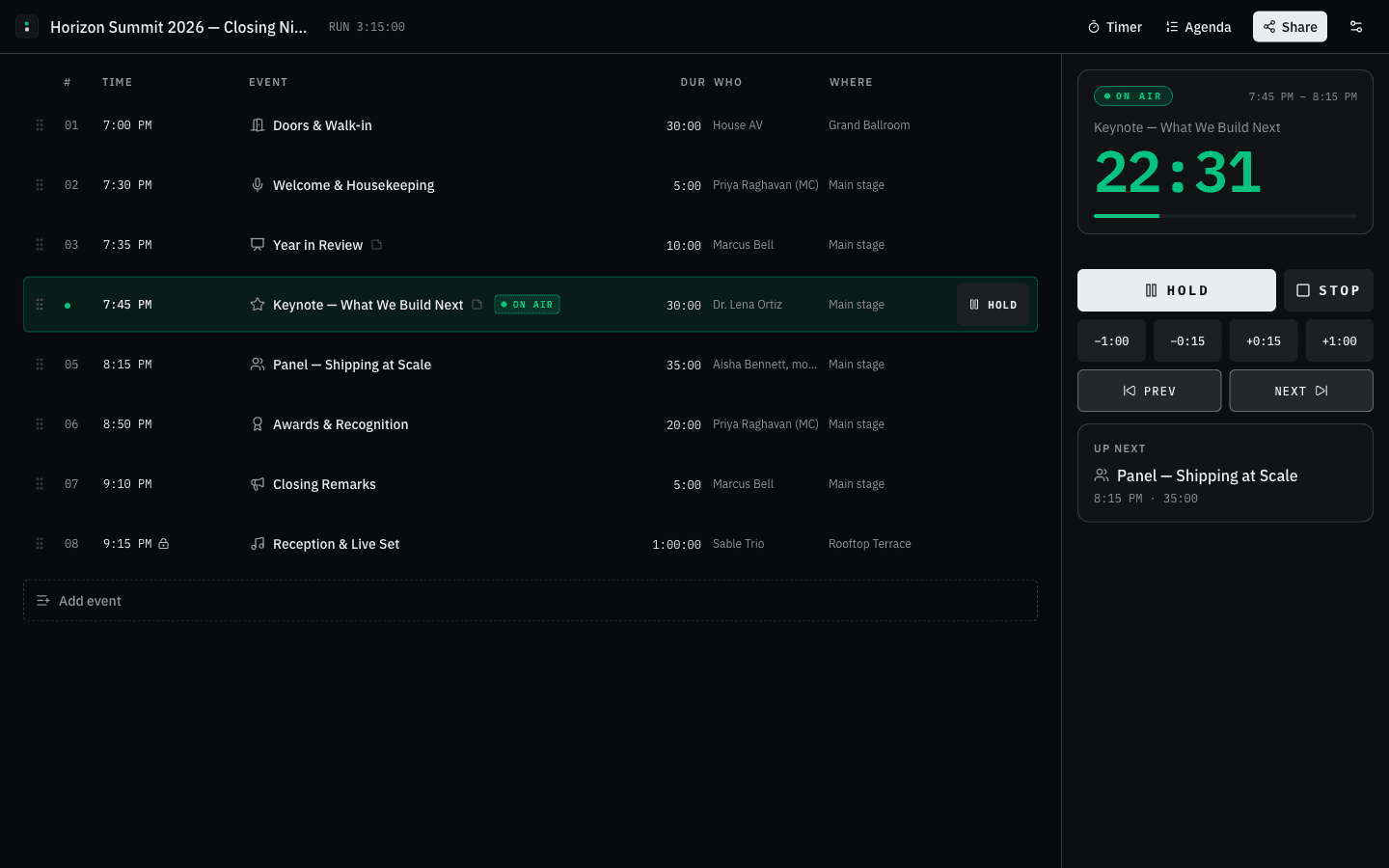
CONTROLLER · DESKTOP
What the producer drives.
The whole run sheet and the transport on one screen — GO, HOLD, STOP, ±time, next and previous — with the live cue tinted and what is coming up held in the rail. Owners and managers get this view. Everyone else gets a read-only link.
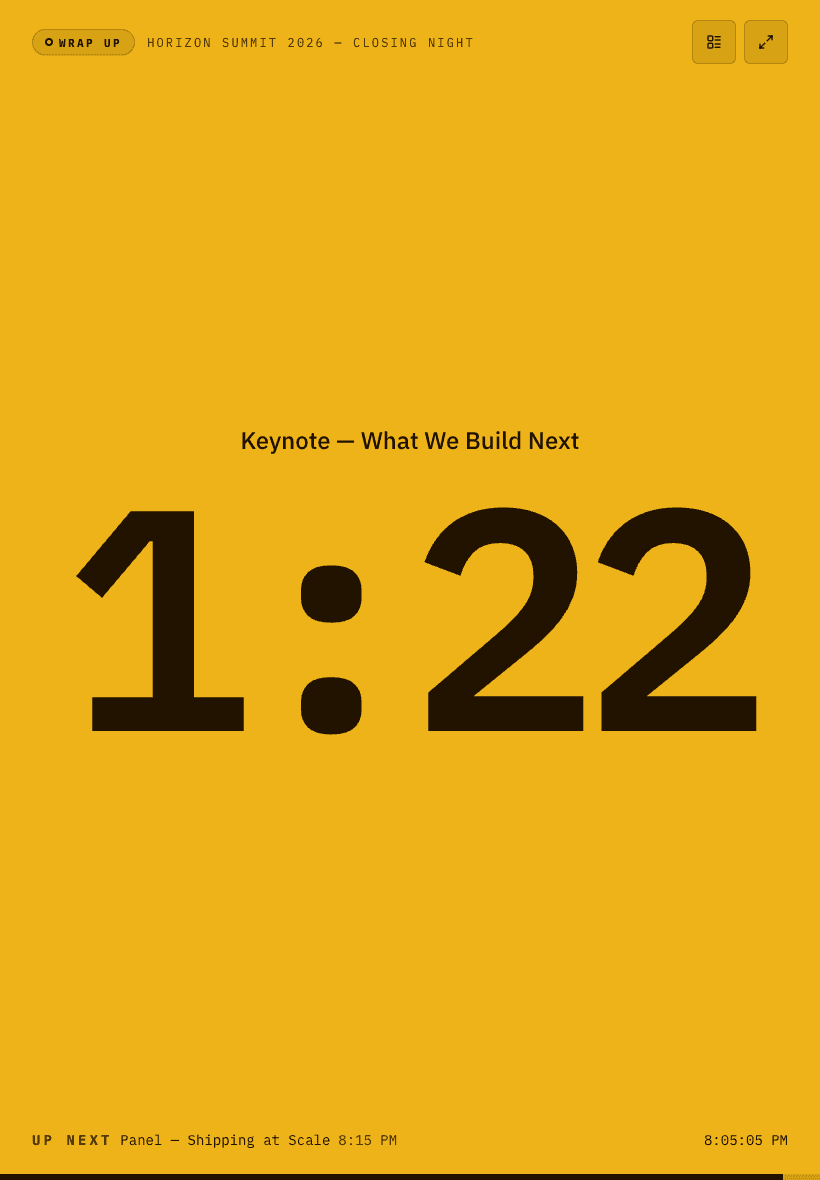
TIMER · TABLET
What the room reads.
Cue name and time left, sized to be read from the back of a room — a confidence monitor, a green-room screen, a tablet on the lectern. Past the warning mark the surface floods yellow, then red in overtime. Every state is spelled out, not just colored.
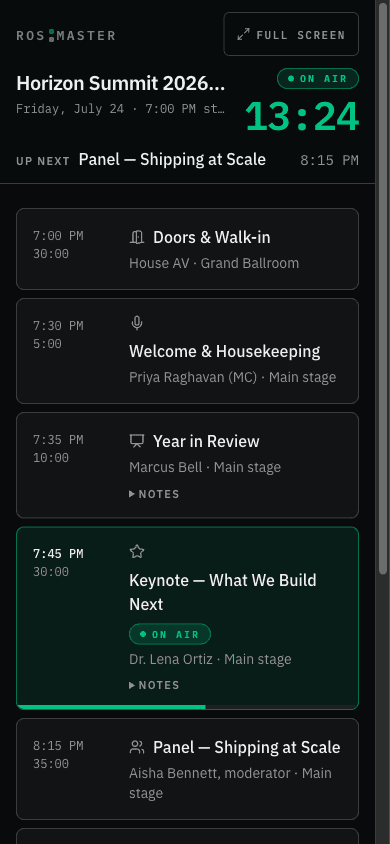
AGENDA · PHONE
What the crew carries.
The running order, live, with the item on air ringed and the countdown pinned to the top as it scrolls. Speakers and volunteers open a viewer link and see this — no install, no account, nothing to explain five minutes before they are needed.
Screens captured from the running app. The rundown in them is a demonstration show.
How it works
From a blank sheet to a called show.
Build
Draft the rundown in minutes — names, durations, owners, locations, notes. Times compute themselves.
Share
Send viewer links to speakers and crew, manager links to your co-producers. Screens sync the moment they open.
Call it
Hit GO. Pause, stretch, skip, and re-cue in real time while everyone watches the same clock.
Hardware and API
Put the transport under your thumb.
STREAM DECK
A plugin for Elgato Stream Deck maps the transport to physical keys: start the next cue, pause and resume, stop, and jog ±30 seconds — plus a key that renders the live countdown in its own yellow/red cue colors. Authorize it from your browser; there is no key to paste.
REST API
app.rosmaster.io/api/v1 — read the timer and drive it from your own show control: start a cue, pause, resume, stop, adjust time. Bearer keys are created and revoked from your account page on Pro, and every response carries the server clock so your client can drift-correct.
Pricing
Free to start. Pro when the shows stack up.
FREE
Everything you need to call one show.
- 1 show · 25 events
- Live-synced timer + agenda views
- Yellow / red cue lights
- Viewer share links
- No account required to start
PRO
FOR SHOW CALLERSFor people who run shows every week.
- Everything in Free
- Unlimited shows and events
- Manager share links — co-edit with your team
- API keys for the REST API and the Stream Deck plugin
7 days free, then $15 per month. Cancel anytime.
FAQ
Questions from the booth
Do speakers and crew need accounts?
No. Send them an invite link — they can join as guests in one tap and see the live timer and agenda on their own phone or a side-stage monitor.
How do the yellow and red cues work?
Every event has thresholds — say, yellow at 2:00 remaining and red at 0:30. The timer surface changes color for everyone watching at the same moment, and counts up in red if you run over. Each state also carries its own word and shape — WRAP UP, FINAL, OVER — so the cue survives a colorblind operator and a washed-out screen. Defaults are per show, overridable per event.
What happens when a segment runs long?
ROSmaster rundowns auto-flow: each event starts when the previous one ends, so a duration change ripples through the rest of the night. Events with hard start times stay pinned, and the sheet shows you exactly where the gaps and overlaps are.
What if the venue Wi-Fi drops?
The clock does not live on your laptop. Timer state is written on the server with server timestamps, and every screen measures its own offset from the server clock and corrects for it — so a screen that loses its connection keeps counting from the last thing the server said instead of guessing. What it will not do is pretend: when the realtime channel drops, the surface shows RECONNECTING, or OFFLINE if the device itself is off the network — in plain grey, never a cue color, because a dropped connection is not a cue. On the way back it refetches and re-syncs the clock, so a laptop that slept through an act returns to the right time.
How accurate is the sync?
Timer state lives on the server with server-side timestamps, and every screen corrects for its own clock drift. Screens typically agree within a fraction of a second.
What's included in the free plan?
One show with up to 25 events, the full controller, live timer and agenda views, cue lights, and viewer share links. You don't even need an account to try it.
Does “one show” mean one at a time?
One show in your account at a time — not one show ever. The limit counts the shows you own, so a rundown someone else shares with you doesn't use it up. Delete last month's show and you can build the next one. If you run something weekly and want the old rundowns to stay put, that's Pro.